
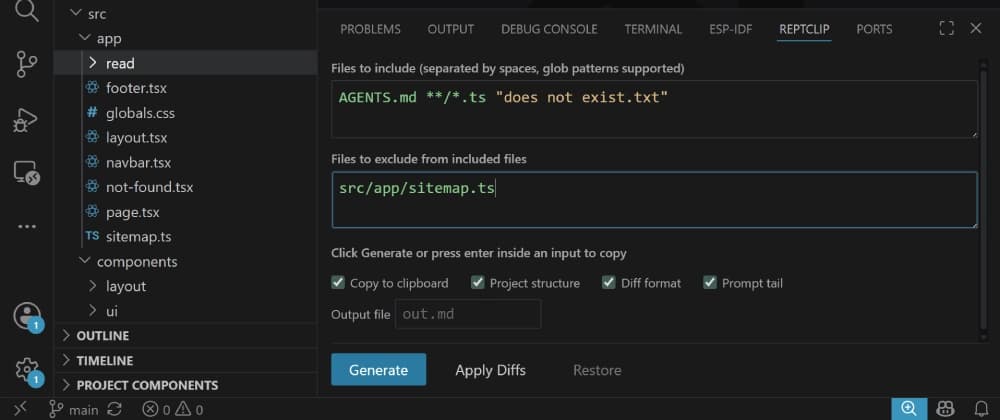
I am going to use this extension to redesign my website's landing page. First, we need to prepare the context.
Specify which files to add to the context in the "Files to include" input. You can use glob patterns like /.ts.
Since I want to update the landing page, let's add page.tsx. You will get suggestions as you type:
This order is preserved in the context output. page.tsx will appear after AGENTS.md.
Now, click "Enter" again. The context will be copied directly to your clipboard. It looks something like this:
.github/workflows/deploy.yml .gitignore .vscode/settings.json AGENTS.md LICENSE.md README.md components.json eslint.config.mjs next.config.ts package-lock.json package.json postcss.config.mjs public/favicon.ico public/favicon.svg read/ble-basics-in-esp-idf.md read/esp-idf-vscode-setup-guide.md read/header-files-in-c.md read/wired-embedded-protocols.md reptclip-config.toml src/app/footer.tsx src/app/globals.css src/app/layout.tsx src/app/navbar.tsx src/app/not-found.tsx src/app/page.tsx src/app/read/[id]/[chapter]/page.tsx src/app/read/[id]/page.tsx src/app/read/page.tsx src/app/sitemap.ts src/components/content-list.tsx src/components/explore-projects-button.tsx src/components/feature-card.tsx src/components/layout/top-nav.tsx src/components/page-header.tsx src/components/page-section.tsx src/components/post-component.tsx src/components/post-list.tsx src/components/project-list.tsx src/components/scroll-header.tsx src/components/site-footer.tsx src/components/social-links.tsx src/components/theme-provider.tsx src/components/ui/action-link.tsx src/components/ui/badge.tsx src/components/ui/button.tsx src/components/ui/card.tsx src/components/ui/dropdown-menu.tsx src/components/ui/mode-toggle.tsx src/lib/courses.ts src/lib/labels.ts src/lib/markdown.tsx src/lib/posts.ts src/lib/types.ts src/lib/utils.ts tsconfig.json
Click "Apply Diffs" in the ReptClip tab. The extension reads the diffs from the clipboard and applies them to the files:
If you didn't like the changes, clicking "Revert" reverts all affected files to the previous state.
State is stored on a per-project basis. So, when you come back, your configuration will not be gone or mixed up with other projects.
If you want to use the extension purely for context, uncheck Diff format to remove the ## Output format section.
Here are a few edge cases explained: Files to include /.py main.py: All Python files are included, but main.py comes last. Files to include /.py src//.py: All Python files are included, but the Python files in src come last. Files to include /.py, files to exclude secret.py: All Python files are included, except secret.py`.
So, that's basically what the extension does. If you liked it, a ⭐ on GitHub would really help A LOT! Please feel free to share it with friends or teammates who are looking for a $0 AI coding setup. GitHub Repository VS Code Marketplace Open VSX
Also, please tell me what you think in the comments. It really helps me improve the extension further. Big thanks to @piekwerk and @mansio for their suggestions during development!
Also, thanks to @unitbuilds for informing me about the limited-time free access to Qwen 3.8 Flash in Qoder. It wouldn't have been possible without it.
I purposefully kept the source code minimal and lightweight. Feel free to submit pull requests. I review them every day!
I created this extension specifically to help developers who can't afford paid coding agents, giving everyone access to a smooth AI workflow for free.