
This is a submission for DEV's Summer Bug Smash: Smash Stories powered by Sentry.
When I was building the push notification system for ShelfTalk — a real-time social app that won the GitHub Finish Up A Thon Challenge on DEV — I wanted to be considerate of my users. There's nothing more annoying than actively chatting in a web app and having your desktop ping you with a notification for the exact message you're currently reading.
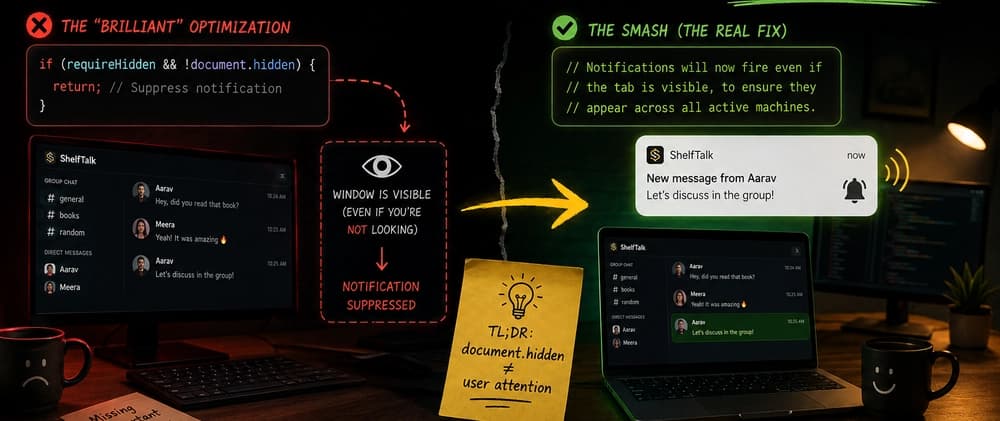
The logic was simple: check document.hidden (the Page Visibility API). If the user is currently looking at the ShelfTalk tab, suppress the desktop notification. No redundant pings. Clean UX.
A few days later, the bug reports started rolling in. Users were complaining that they were missing important direct messages and group mentions.
I tested it on my machine. I minimized the browser, had a friend send me a message, and — ding! — the notification popped up perfectly. I opened the window, got another message, and no notification appeared. It was working exactly as designed.
"Oh, I usually leave ShelfTalk open on my second monitor while I work on my main screen."
The Page Visibility API (document.hidden) only returns true if the page is completely hidden — either behind other windows in a background tab, or in a minimized window. If the window is visible on a second monitor — even if you are actively working in a completely different app on your main monitor — document.hidden is false.
Because the tab was technically "visible" to the operating system, my code assumed the user was staring directly at it. It silently dropped every notification. The user, focused on their main screen, never heard a ping and missed the message entirely.
Even worse: if a user left ShelfTalk open on their desktop at the office and went home, their home laptop would never notify them either — because the office machine was technically still "looking" at the app.
TL;DR: document.hidden === false does not mean the user is paying attention. It just means the OS can see the window.
Sometimes, the best way to fix a bug is to delete the code you were so proud of writing.
We often try to be "too smart" with our UX optimizations. I assumed that "window visible" equaled "user paying attention." In the era of ultra-wide monitors, multiple screens, and users being logged in on five different devices at once, that assumption was completely wrong.
By trying to save users from a slightly annoying notification, I ended up breaking the core promise of a notification system: telling you when something happens.
Three things this bug taught me: Test with real user setups, not just yours. My single-monitor dev machine couldn't reproduce the issue. Multi-monitor setups, tablets propped up on desks, browsers left open on work machines — these are all "visible" to the OS. document.hidden is about the OS viewport, not human attention. The MDN docs are clear about this, but it's easy to project human meaning onto a boolean that was never designed to carry it. When in doubt, notify. A slightly redundant ping is annoying. A silently dropped message is a broken product.
Now, ShelfTalk might ping you even if you're looking right at it. But at least you'll never miss a message again. 🔔