
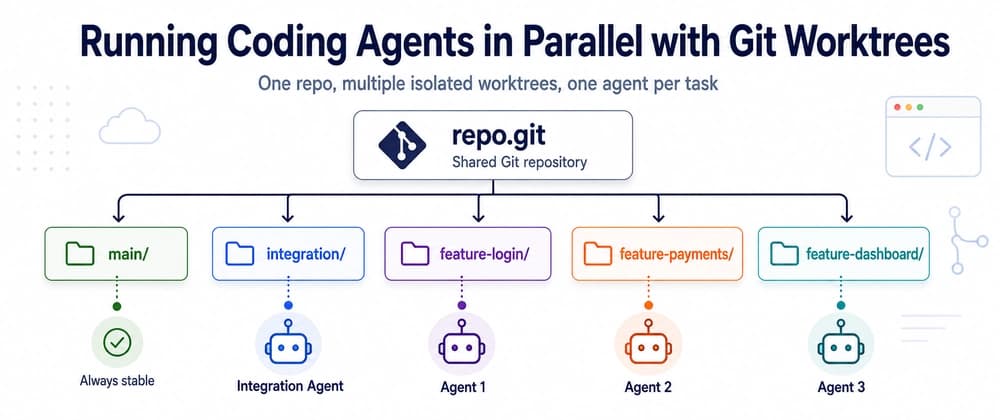
I kept hitting the same wall with coding agents. One Claude Code or Codex session in a repo works great. The moment I wanted two tasks moving at once - login in one terminal, payments in another - they started stepping on each other. Same working directory, same checked-out branch, two processes editing the same files. Chaos.
The fix turned out to be a Git feature that has been sitting there for years: git worktree. It gives you several working directories backed by the same repository. Each folder has its own checked-out branch, but all of them share the same objects, commits and branch list.
Now every agent gets its own folder. One terminal per worktree, one agent per terminal, and nobody touches anybody else's files:
My first instinct was: agent finishes login, pushes the branch, then I pull it into integration. That's the muscle memory from working in a team.
It's unnecessary here. All the worktrees belong to the same repository on the same machine, so Git already knows every branch locally. When agent 1 finishes:
No git push, no git pull. The directories are different, but feature/login and integration are branches of the same repo. When integration is green:
You don't even have to wait for a worktree to be deleted before merging its branch. Both folders can exist at the same time. The only thing Git refuses is having the same branch checked out in two worktrees at once - which is exactly the protection you want when agents are involved.
git worktree remove deletes the folder and cleans Git's internal registry. If you already nuked the folder by hand, git worktree prune fixes the bookkeeping after the fact.
For the agents to collaborate on one machine: nowhere. Git itself is the communication mechanism.
GitHub earns its place the moment humans enter the loop - PRs, review, CI, an audit trail:
And if you want integration to merge exactly what's on the remote rather than the local branch:
I now think of it as two separate planes. Locally: worktree → commit → merge into integration → tests. Remotely: push → PR → review → CI. The second plane is for people; the first one is where the agents actually work.
The detail that sold me on the whole thing: the integration agent never copies code from the other agents, never reads their folders, doesn't even know they exist. It only knows their branch names. Git was the message bus all along.
Worktrees isolate files and branches. They don't isolate runtime. The moment two agents each run npm run dev and a Playwright suite, they all reach for :3000, the same test database, and a surprising amount of RAM per headless browser.
The workaround I use today is boring: each worktree gets its own port through an env file written at creation time, and Playwright reads it for its baseURL:
But ports are only the visible part of the problem. Isolating test databases, keeping three browser suites from eating the machine, and deciding whether integration should be the only worktree allowed to run E2E at all - that deserves a post of its own. It's the next one I'm writing.
So in some cases is better to use isolated agents on VPS and i have another article that talks about that https://dev.to/servatj/the-ai-dev-environment-nobody-teaches-you-written-by-my-ai-agent-directed-by-me-p--1dg4