
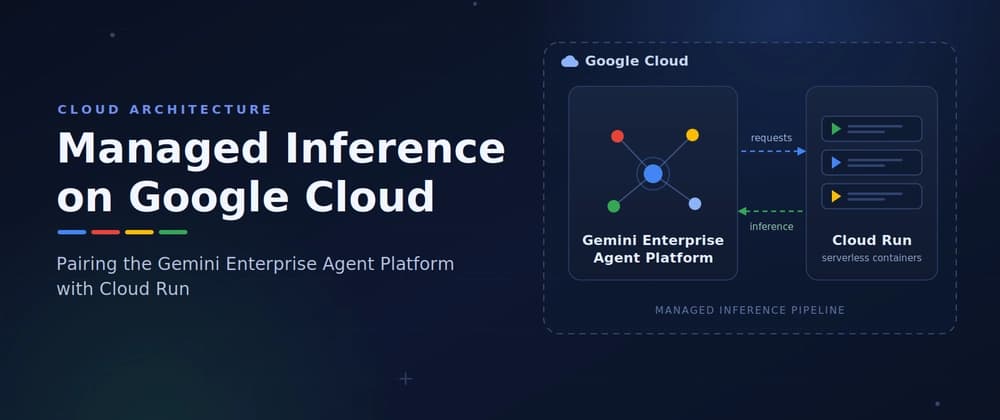
If you have ever wanted to ship an AI-powered application without managing GPUs, model servers, or scaling infrastructure yourself, this guide is for you.
Managed inference simply means letting a cloud provider run the AI model for you: you send a request, the platform handles the compute, and you get a response back. On Google Cloud, the cleanest way to do this today is to pair the Gemini Enterprise Agent Platform (formerly Vertex AI) with Google Cloud Run, dividing responsibilities between the two services. The Agent Platform serves as the orchestration and intelligence engine, while Cloud Run hosts your custom application logic, front-end UIs, or Model Context Protocol (MCP) servers.
By the end of this article, you will be able to: Explain the hybrid architecture and why each layer exists Define an AI agent in code using the Agent Development Kit (ADK) Deploy your app layer to Cloud Run with a single command Choose between online and batch inference for your workload Secure and monitor the whole setup in production
New to the underlying concept? Start with Google Cloud's primer: What is AI inference?
To follow along hands-on, you will need: A Google Cloud project with billing enabled The gcloud CLI installed and authenticated Python 3.10+ and the ADK installed (pip install google-adk)
You can also read this purely as an architecture walkthrough; every step is explained, not just shown. The Architectural Blueprint
Why split it this way? Each tier scales independently and fails independently. Your web front end can handle a traffic spike without touching the model layer, and you can swap models without redeploying your application code. It also creates a clean security boundary, clients only ever talk to Cloud Run, never directly to the model.
Here is what each layer actually does: Cloud Run runs your specialized business logic, secures client-facing endpoints with Identity-Aware Proxy (IAP), and hosts external tools, MCP servers, and APIs. Think of it as everything you build. The Agent Platform (Agent Runtime) manages active agent state, long-term memory, and the model's reasoning steps in a centralized, fully managed runtime. Think of it as everything Google runs for you. Build Your Agent Code with the ADK
Use the open-source Agent Development Kit (ADK) to define your agent's behavior in code and bind it to a model. The key idea to understand: tools are plain Python functions. The ADK reads each function's docstring to decide when and how to call it; so a clear docstring is not documentation nicety, it is part of your agent's logic.
Breaking down the four fields: name — an identifier for your agent, used in logs and traces. model — which Gemini model handles the reasoning. Flash models are faster and cheaper; Pro models handle more complex reasoning. instruction — the agent's system prompt, shaping its behavior on every request. tools — the Python functions the model is allowed to call. When a user request matches a tool's docstring, the model invokes it.
Note: Gemini 1.0 and 1.5 models (including gemini-1.5-pro) have been retired and now return errors. Always target a currently supported model, such as gemini-3.5-flash, gemini-3.6-flash, or a Gemini 3.x Pro release from Model Garden. Containerize and Deploy the App Layer to Cloud Run
When deploying your orchestration backend or front-end dashboard, the tooling can package and push the container for you. Two small steps get you there.
In Google Cloud, services do not trust each other by default, your Cloud Run instance needs explicit permission to invoke Agent Platform endpoints. This command grants its service account that permission:
In plain terms: "let this Cloud Run service call the AI platform." This is the step people most often forget; if your deployed service returns permission errors, come back here first.
The ADK ships with a one-command deployment path. Under the hood, it does three things: builds your container image, pushes it to Artifact Registry, and creates (or updates) the Cloud Run service.
Alternatively, the Agents CLI (agents-cli) can scaffold the deployment configuration for a Cloud Run target. For example, agents-cli scaffold enhance --deployment-target cloudrun and works from inside your preferred AI coding tool. Either route wires up your environment variables, including model targets and the public service URL. Online and Batch Inference Routines
Once the plumbing is in place, there are two primary ways to trigger managed inference. Choosing correctly comes down to one question: does a human need the answer right now? Online inference (low-latency UI): Make synchronous API calls from your Cloud Run front end directly to the deployed agent endpoint for real-time chat, tool calls, or step-by-step reasoning. Example: a customer support chatbot where every second of latency matters. Batch inference (high-volume data): For large data processing jobs, submit an asynchronous batch prediction job through the Agent Platform SDK. The platform provisions dedicated compute, runs the inference tasks, writes results and logs to Cloud Storage, and tears down the compute automatically when the job completes. Example: classifying 100,000 support tickets overnight; nobody is waiting on a single response, so throughput and cost matter more than latency.
Batch jobs are typically much cheaper per request, so a good rule of thumb is: default to batch, and reserve online inference for genuinely interactive experiences. Secure and Monitor the Architecture