
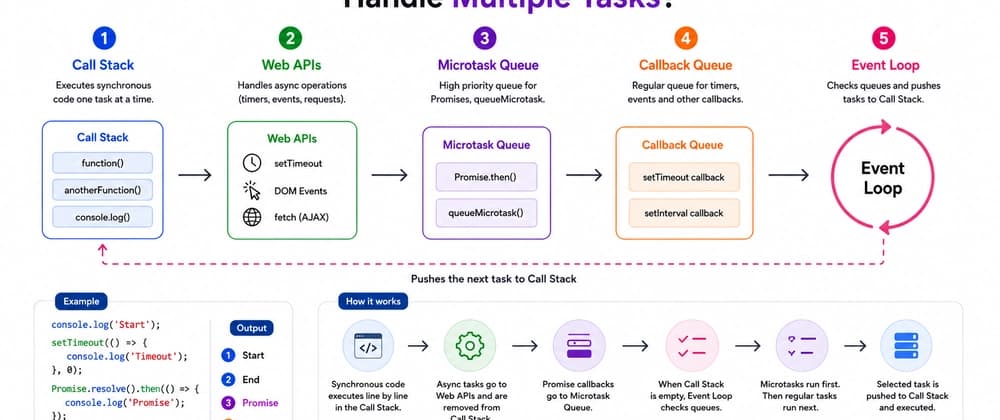
That means it has one main thread and can execute one piece of JavaScript at a time.
Let's break it down step by step. The Call Stack — Where JavaScript Executes Code
Instead, it hands the timer to the browser. Web APIs — Where the Browser Handles Asynchronous Work
setTimeout fetch DOM events addEventListener Geolocation And many other browser capabilities
It first has to wait in a queue. Callback Queue — Where Regular Async Callbacks Wait
Once an asynchronous operation is complete, its callback can be placed into the Callback Queue, also called the Task Queue.
The Event Loop checks the Microtask Queue before taking the next regular callback from the Callback Queue. Microtasks Get Priority
Synchronous code → Microtasks → Regular tasks A Real Example That Confuses Many Developers
This single example explains a huge part of how the Event Loop works. Does setTimeout(..., 0) Run Immediately?
"Run this callback after at least the specified delay, when the browser gets a chance to schedule it and the Call Stack is available."
The callback also has to wait for its turn in the Event Loop. Why Can JavaScript Still Feel Like It Does Multiple Things at Once?
While those operations happen outside the Call Stack, JavaScript can continue doing other work.
The surrounding environment makes asynchronous behavior possible. Why Does the Event Loop Matter in Real Applications?
Button clicks cannot be processed Timers cannot run Promise callbacks cannot execute The page can become unresponsive
Why a UI becomes unresponsive Why timers don't always run exactly on time Why Promises often execute before setTimeout How asynchronous JavaScript actually works Why blocking the main thread is expensive
JavaScript may be single-threaded, but with the help of the browser, queues, and the Event Loop, it can handle a huge number of asynchronous operations without stopping your entire application.